
Move shapes between Cavalry and Cinema 4D.

Cavalry Bridge is a live link between the two apps. Send Cavalry graphics, with their animation, to Cinema 4D as real spline objects, and stream Cinema 4D splines back into Cavalry as you edit them.

Free · Windows · Cinema 4D R23+ (tested on 2026) · Cavalry 2.x
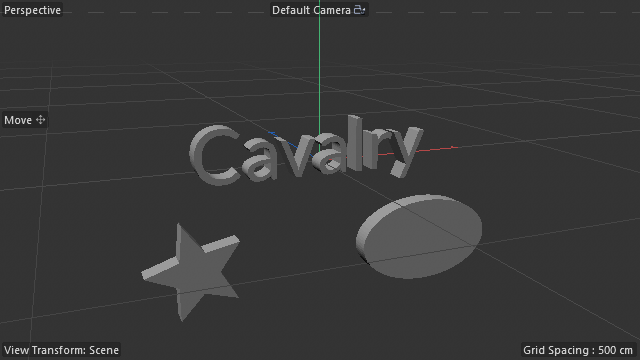
Cinema 4DCavalry text, star and ellipse extruded in Cinema 4D
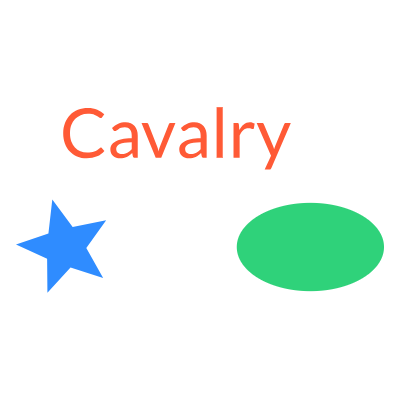
CavalryThe same shapes in Cavalry

What it does

Three things, in both directions. Everything runs on your own computer: the two apps talk over a local connection and nothing goes online.

Cavalry → Cinema 4D

Shapes become real splines

Select layers in Cavalry and click Send Selected to C4D. Shapes arrive as Cavalry Splines, genuine spline objects like Circle or Text.

  • Send as Group: your folders become Nulls, each shape its own spline, transforms kept
  • Send as Single object: everything in one spline
  • Works directly in Extrude, Sweep, Loft and Lathe; holes stay holes
  • Resize with the Scale tool, like any primitive
  • Saved with your scene
Cavalry → Cinema 4D

…with their animation

Tick Animation (PSR) and every layer and folder arrives with its position, rotation and scale keyframes.

  • Animated groups stay animated groups
  • Eases are rebuilt as curve handles on the original keys
  • Bounce, Spring and other complex eases get one key per frame
  • Timing is kept in seconds across frame rates
Cinema 4D → Cavalry

Live splines in Cavalry

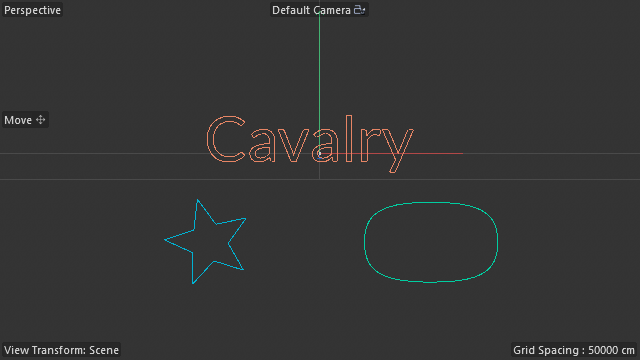
Select splines, 3D objects or whole folders in Cinema 4D, click Send, and they appear in Cavalry as editable shapes that follow every change you make.

  • 3D objects (Cube, Torus, Landscape…) arrive as their outline, holes included
  • Null folders become Cavalry groups, nested and kept in sync
  • Renames, moves and hiding follow live
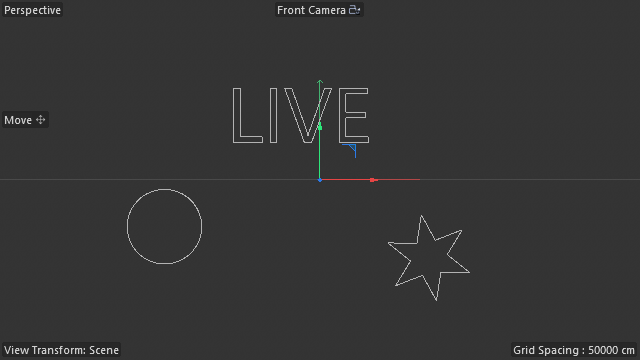
  • Seen through the C4D camera, or flat world XY
  • Or in 3D: a Cavalry camera matching C4D's, with splines, text and planes standing in 2.5D space
  • Tick Animation to key every frame: one layer per object, ready to render
  • Connects by itself whenever Cinema 4D is running

Install

One setup program puts everything where each app expects it. No admin rights are needed.

  1. Download CavalryBridgeSetup.exeFrom the latest release.
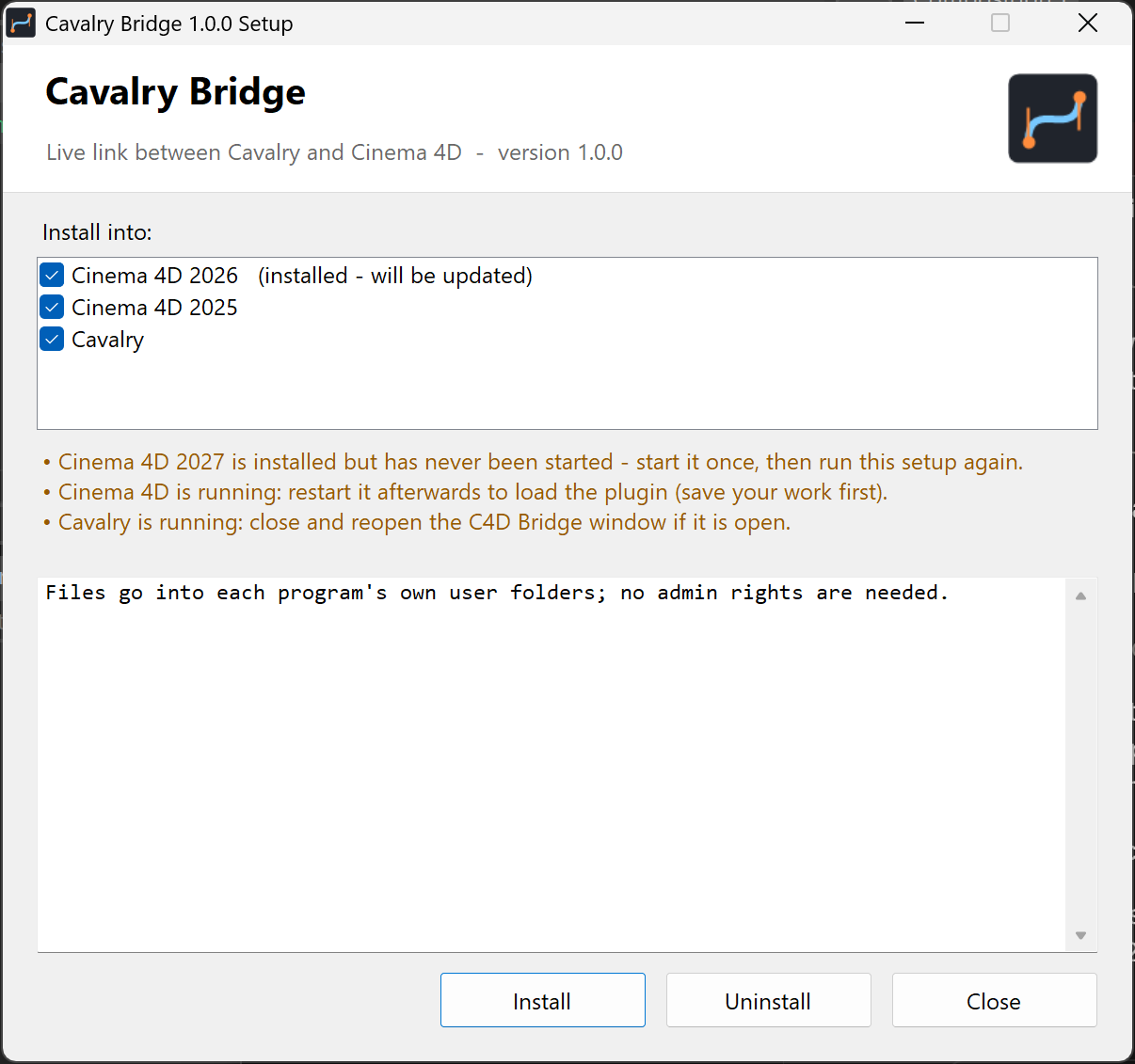
  2. Run itIt lists every Cinema 4D version it found and Cavalry. Tick the ones you want and click Install.
  3. Restart Cinema 4DCinema 4D only loads plugins when it starts.
  4. In Cavalry, open Window › Scripts › C4D BridgeThe first time, Cavalry asks whether to trust the script, because it makes network calls on your computer. Choose to trust it, or it can't connect. From then on it connects to Cinema 4D by itself.
"Windows protected your PC"? The setup isn't code-signed yet. Click More info, then Run anyway.
The Cavalry Bridge setup window
The setup lists what it found, and why it skipped anything.
AppInstalled into
Cinema 4D%APPDATA%\Maxon\<version>\plugins\cavalry_bridge (one plugin, opened from Extensions › Cavalry Bridge)
Cavalry%APPDATA%\Cavalry\Scripts\C4D Bridge.js

Use

Everything happens from two small panels: Window › Scripts › C4D Bridge in Cavalry and Extensions › Cavalry Bridge in Cinema 4D.

Cavalry → Cinema 4D

Send shapes

  1. Select layers or groups in CavalryAny shape works: primitives, text, editable shapes, duplicators.
  2. Choose Send asGroup rebuilds your folders as Nulls, one Cavalry Spline per shape. Single object merges everything into one. Tick Animation (PSR) to bring keyframes too (Group).
  3. Click Send Selected to C4DThe new objects appear at the top of the active C4D document.
Cinema 4D → Cavalry

Stream splines

  1. Open Extensions › Cavalry BridgeThe panel shows whether Cavalry is connected. Dock it anywhere, like any manager.
  2. Select objects and click Send Selected to CavalrySplines (Text, Circle, Star…), 3D objects, or a Null with everything inside it.
  3. Watch them appear in CavalryFolders become groups; shapes follow your changes live. Send again to send something else; click Send with nothing selected to stop.
  4. Optional: tick Animation before sendingEvery frame of the preview range is keyed in Cavalry, one layer per object. Send again after changing the animation.
  5. Optional: 3DIn Cavalry, set Mode to 3D (C4D camera). Tick Camera animation in C4D before sending to key the camera's moves too; Cavalry then switches to 3D by itself.

The C4D Bridge window in Cavalry

ControlWhat it does
Connect · DisconnectThe window connects by itself whenever Cinema 4D is running, and again after C4D restarts. It only does work when something in C4D changes. Disconnect pauses it; Connect resumes.
ModeScreen places shapes as the C4D camera sees them. World XY uses C4D's X/Y coordinates. 3D (C4D camera) rebuilds the scene in Cavalry's 2.5D space: a C4D Camera layer matches the C4D camera's position, rotation and lens, and flat objects (splines, text, planes) stand where they are in C4D, turning in 3D. Solid objects stand as their outline facing the camera. Cavalry draws the perspective, so you can reframe with its camera.
World scaleWorld XY and 3D: Cavalry pixels per C4D unit. In 3D it scales the camera too, so the framing stays the same.
Follow C4D camera3D: the C4D Camera layer follows Cinema 4D's camera. Untick it to reframe yourself; its Position Offset and Look At Offset are always yours.
Rotation · Perspective scaleFor non-spline objects: also follow rotation, and shrink with distance from the camera.
Record keysKeyframe incoming position, rotation and scale at the C4D frame, instead of only moving the layer.
Bind SelectedDrive your own Cavalry layer with a C4D object, instead of the layer the bridge creates.
Send asGroup (keep folders): folders become Nulls, every shape its own Cavalry Spline, each with its position, rotation, scale and pivot. Single object: all outlines in one Cavalry Spline.
Animation (PSR)With Send as Group: also send each layer's and folder's position, rotation and scale keyframes. On by default, and remembered.
Send Selected to C4DSend the selected layers to Cinema 4D.

The Cavalry Bridge panel in Cinema 4D

ControlWhat it does
Connection · PortWhether Cavalry is connected, and the port the bridge uses (1234; change it if another program needs that port).
AnimationSend keys every frame of the preview range in Cavalry instead of following live: each outline becomes a path key, other objects get position, rotation and scale keys. Cameras, deformers and generators are all taken into account, since it records what the view shows.
Camera animationFor Cavalry's 3D mode: key the C4D Camera layer's position, rotation and zoom on every frame of the preview range, with or without Animation. The Cavalry window switches to 3D by itself when the keys arrive (you can switch back). In 3D, shapes that keep their form get transform keys only, no path keys.
Send Selected to CavalrySends the selected splines, 3D objects or folders live to Cavalry, replacing what was sent before. Folders bring everything inside. With nothing selected it stops; Cavalry hides those layers, never deletes them. The line below says what's being sent.
Last received · Add Cavalry SplineWhat Cavalry sent last, and a Cavalry Spline that always shows the latest send.

What's being sent is stored on a "Cavalry Bridge" Null the panel adds to your scene, so it's saved with the scene.

The Cavalry Spline object in Cinema 4D

SettingWhat it does
Follow Latest SendOff for objects created by a send: they keep their own copy of the shapes. A Cavalry Spline added from the menu has it on, and always shows whatever was sent last.
Cavalry LayersComma-separated layer names, to keep only some layers. Leave empty for all.
Width · HeightThe spline's size in scene units, like a Rectangle's. The Scale tool and Coordinate Manager change them in Model mode, as they do for primitives. 0 = as sent.
Plane · Reverse · Intermediate PointsThe same settings as Cinema 4D's own spline objects.

How it works

Everything stays on this computer. Cinema 4D writes what it sends to a small file in the temp folder, only when something changes, and Cavalry checks that file's date ten times a second, which costs next to nothing. Shapes going the other way are posted to a small web server inside Cinema 4D on 127.0.0.1:1234.

Cavalry C4D Bridge.js (script window) • Timer: reads the state file when it changes • editable shapes / layers • Send: outlines, transforms, keyframes + per-frame samples WebClient → 127.0.0.1:1234 Cinema 4D: cavalry_bridge plugin state file + HTTP server 127.0.0.1:1234 Cavalry Spline: spline generator, one per send, data saved in the scene Receiver: creates objects + PSR keys on the main thread (curve fitting) Cavalry Bridge tag: writes sent splines and 3D outlines when they change (as the active camera sees them) state file (temp folder) ← splines & transforms (JSON) POST /shapes → new Cavalry Spline(s)

Converting between the two apps

  • Coordinates: both use Y up, and 1 Cavalry pixel = 1 C4D unit. Screen mode maps C4D's camera view (safe frame) onto the Cavalry composition.
  • Rotation: Cavalry turns counter-clockwise, C4D's bank turns clockwise, so the sign flips.
  • Curves: Cavalry stores Bézier handles as absolute points. C4D's spline tangents are relative, and ¾ the length of a standard Bézier handle (C4D's own circle uses 41.4 for radius 100, not 55.2).
  • Layer transforms: Cavalry draws a layer at position + rotation · scale · (local − pivot). Sent as a group, each outline travels relative to its own pivot and each position relative to its parent's pivot, so Nulls in C4D reproduce every level exactly.
  • Finding each other: while Cinema 4D runs, the plugin keeps a small file in the temp folder with its port. Cavalry reads it to connect by itself, without waiting on a refused connection, and leaves a heartbeat file so the C4D panel can show it's connected.
  • 3D objects: all their faces are projected through the camera (or flat onto XY) and filled into a fine grid. The edge of the filled area is traced, straightened, and its corners snapped back onto the mesh's own points, so a Plane arrives as 4 points and a Cone seen from the front as 3.

Rebuilding the animation

Cavalry's scripting API returns each keyframe's value and easing name, but not its curve handles. So the bridge measures the curve: it sends every key plus the value on every frame in between. Cinema 4D then picks, for each segment, the handle length and height whose Bézier curve best fits those samples. That's how an animator shapes an ease by hand.

  • Linear and Slow In/Out land on the original two keys, within 0.02 px over a 300 px move.
  • Stronger eases fit within 0.5%, or an invisible 0.25 px.
  • Anything one curve can't follow (Bounce, Spring) gets a key on every frame, for that stretch only.

How it was built

The bridge was built in one long session: tested live in both apps at every step, with plenty of dead ends. These are the main steps, including the ones that broke. Orange dots mark problems.

  1. "Is a bridge even possible?"

    Both apps can be scripted (Python in Cinema 4D, JavaScript in Cavalry), so the options were file exchange, a person in the loop, or a live socket. Cavalry's documentation showed a built-in WebServer and WebClient, so the live route looked possible.

  2. Cavalry as the server: a freeze, then silence

    A first test started Cavalry's WebServer from an automation script. Cinema 4D could reach it in 1–4 ms, but only via localhost/IPv6 (127.0.0.1 timed out), and Cavalry itself froze and had to be force-closed. From a proper script window, listen() then never opened the port at all.

    Lesson: the real cause turned out to be a security prompt (see below), but reversing the design made the bridge simpler and easier to test anyway.
  3. Reversed: Cinema 4D serves, Cavalry polls

    A Python tag in Cinema 4D now runs a small HTTP server and publishes what the active camera sees. Cavalry polls it with a Timer and WebClient, which Cavalry's docs recommend for polling web APIs. A fetch took 18 ms on the first try.

  4. Nothing arrived, but no errors either

    The script window made no requests at all. The cause was Cavalry asking "…makes Web API calls. Do you trust this script?" when it opens: until you trust a script, its network calls quietly do nothing. Once trusted, cubes animated in C4D moved Cavalry layers to matching positions and rotations.

    Lesson: the install guide now mentions the trust prompt first.
  5. Cavalry shapes to C4D splines

    Any Cavalry shape (text, star, duplicator) can be turned into points by making a temporary editable copy and reading its path in world space. One catch: making that copy hides the original layer, so the bridge restores its visibility afterwards.

  6. Ellipses looked boxy

    Sampling showed C4D's curve bulging outwards. C4D's own Circle has tangents of 41.4 for radius 100, where a standard Bézier handle is 55.2: C4D tangents are ¾ as long. With that scaling the ellipse matched the true curve to within 0.01 units.

  7. From Python Generator to a real spline object

    The first receiver was a Python Generator, but Extrude and Sweep need a true spline. The bridge became a proper plugin with its own spline object. The first version drew everything 3× too large and eventually froze C4D: its two setting IDs (1000 and 1001) clashed with the IDs of C4D's built-in spline settings, so Scale was reading the Intermediate Points value. Moving them to 10000+ fixed both.

    Lesson: when a plugin includes C4D's own spline settings, keep its setting IDs well away from theirs.
  8. One object per send, saved in the scene

    At first every send replaced the same object, and the shapes only lived in memory. Now each send creates its own Cavalry Spline that stores its shapes inside the object, so they survive saving and reopening the scene. The object is created on C4D's main thread, which the server notifies when shapes arrive.

  9. Position, rotation and scale animation

    Cavalry's keyframes give values and easing names, but no handles. The bridge samples the motion and fits Bézier handles to it, length as well as height. With handle length fixed at a third, Slow In/Out fell back to keys on every frame; letting the length vary brought every ease back to its original two keys.

  10. Phantom duplicates in Cavalry

    During the C4D → Cavalry tests, each spline suddenly had two Cavalry layers. Viewport captures render a temporary copy of the document, and the tag had published that copy's objects, whose IDs differ. The tag now publishes only from the active document.

  11. An installer that finds both apps

    First a batch file, then, as requested, a real .exe. It's compiled with the C# compiler that comes with Windows, and all the files travel inside it. It finds each Cinema 4D version that has been started and Cavalry, and installs into their user folders without admin rights. The first build's window overlapped on a high-DPI display, so the layout now scales with the screen's DPI.

  12. 1.1: connecting by itself, without freezing

    Auto-connect looked like a simple retry loop, until a test showed a refused connection blocks Cavalry for about 2 seconds on Windows. Retrying would have stuttered Cavalry every few seconds whenever Cinema 4D was closed. Instead the plugin keeps a small presence file (port, process) while C4D runs, and Cavalry checks it instantly before connecting.

  13. 1.1: why the Scale tool did nothing

    Tried live: the Scale tool grew a native Circle but left a Cavalry Spline untouched. Logging what Cinema 4D sends showed why. In Model mode it resizes parametric objects through their length settings (like Circle's Radius), and the Cavalry Spline only had a plain Scale multiplier. It now has Width and Height in scene units, and the Scale tool resizes it like a primitive.

  14. 1.1: folders, both ways

    Sending a Cavalry group now rebuilds it in C4D as Nulls with every level's position, rotation, scale and pivot (and keyframes). The test group, rotated and scaled with an animated child, landed within 1 px of Cavalry at every frame checked. From C4D, linking a Null streams its whole hierarchy into Cavalry groups, following renames, moves and hiding live; deleted objects are hidden, never deleted.

  15. 1.2: a panel instead of scripts

    In real use, sending from Cinema 4D was hard to find: it meant selecting objects and running a script, and User Scripts had grown three bridge entries (one current, two old copies). Now Extensions › Cavalry Bridge opens a panel with the connection status, one Send button and what last arrived. A first version had a list and five buttons; testing showed that selecting objects and clicking Send is all anyone wants. The plugin became a single file, and the installer removes the old scripts.

  16. 1.2: a busy console, and a quiet one

    Cavalry's console filled with a request every 33 ms, even when nothing moved. Now Cinema 4D writes a state file only when something changes, and Cavalry just checks its date. One slip on the way: Cavalry's writeToFile won't replace a file unless told to, so the first heartbeat logged an error every two seconds.

  17. 1.2: a Plane arrived as a circle

    3D objects had no spline to send, so Cavalry drew a placeholder circle. Tracing the edges where front faces meet back faces gave jagged blobs: seams, poles and faces seen edge-on broke the loops. What works is plainer: fill every projected face into a grid, trace the filled area, then snap its corners back onto the mesh. Plane, Cone, Torus, Sphere, a rotated Cube and a Landscape now match the C4D view, holes included.

  18. 1.2: shapes missing in the Front view

    Some objects reached Cavalry's layer list but never drew. Flat views (Front, Top…) place their camera anywhere, so objects could sit "behind" it, and the bridge skipped them. Only a perspective camera has a behind now.

  19. 1.2.1: "we lost the animation"

    Keys from Cavalry stopped arriving. Sending the same group by hand showed both ends still worked: the Animation (PSR) box simply started unticked each time the window opened. It now starts ticked and remembers your choice.

  20. 1.2.1: animation the other way

    The first idea was a snapshot layer per frame: 250 layers per object. Cavalry can key a shape's path instead (its inputPath), even with a different point count on each key. So Cinema 4D steps through the preview range, records each object's outline on every frame, and Cavalry keys one layer per object. A turning cube and a moving circle matched the C4D view frame for frame.

  21. 1.2.2: a flood of "Point UIDs" errors

    Cavalry's console filled with "Error re-syncing Point UIDs on Animating Path". Cavalry pairs points from one path key to the next, and a turning cube's outline has a different number of points (sometimes of contours) on each frame. Now every frame is padded to the same layout: extra points are copies of existing ones, and a contour missing on a frame shrinks to a single point, so the shape on each frame stays exactly the same.

  22. 1.3: a 3D mode, measured rather than guessed

    Cavalry's camera has a Zoom but no field of view, and its docs don't say which way its axes turn. So coloured dots were placed at known 3D positions, rendered through a camera at a range of settings, and located in the pictures. Zoom turned out to be the focal length in pixels, the camera looks down −Z, and layers and the camera turn in slightly different orders. With that, a moving C4D camera and rotated Rectangle, Circle, Text, Plane and Cube matched the C4D render within a pixel or two on every frame tested.

Limits & troubleshooting

What the bridge doesn't do (yet), and what to check when something doesn't arrive.

Nothing arrives in Cinema 4D
  • Restart Cinema 4D after installing: plugins only load at startup.
  • In Cavalry, reopen the C4D Bridge window and accept the trust prompt.
  • The status line under "Send Selected to C4D" says whether C4D was reachable.
Cavalry keeps "Waiting for Cinema 4D"

Cinema 4D must be running with the Cavalry Bridge plugin loaded (restart it after installing); Extensions › Cavalry Bridge shows its status. If another program uses port 1234, change the Port in that panel; Cavalry picks up the new port by itself.

Bind Selected moved my layers

Binding a layer to a C4D folder makes it that folder: the bridge then puts the folder's layers inside it. Pick the object you mean in the Bind dropdown before clicking.

Keyframes land between frames

Timing is kept in seconds. If Cavalry is at 25 fps and C4D at 30 fps, Cavalry frame 92 becomes C4D frame 110.4. Use the same frame rate in both for keys on whole frames.

Shapes don't line up in Screen mode

Give the C4D render the same aspect ratio as the Cavalry composition. Screen mode follows whatever camera the active viewport looks through.

Current limits
  • Outlines only: fills, gradients, stroke widths and effects don't transfer, and strokes arrive as their centre line.
  • Keyframed position, rotation and scale only: behaviour-driven motion (Noise, Oscillator) isn't included.
  • Single object merges outlines in world space, without animation; use Group for keyframes.
  • Animated outlines (text animators, trims) arrive as they look at the playhead frame.
  • C4D → Cavalry: animation arrives as a key on every frame (tick Animation), not as the original keys. Cubic, Akima and B-spline curves are sent as many straight segments.
  • 3D objects arrive as one flat outline (their silhouette), without inner edges or shading. Above 120,000 triangles they arrive as their convex outline.
  • 3D mode: solid objects are flat cards facing the C4D camera, so they stay flat when Cavalry's camera reframes. It needs a perspective camera; film offset doesn't carry over, and the comp should match the C4D render's aspect ratio (the window says when it doesn't).
  • Windows only for now. The scripts themselves aren't Windows-specific.
Is it safe?

The server only listens on 127.0.0.1, so other computers can't reach it, and the shared files stay in your own temp folder. Setup writes only to your own user folders and never needs admin rights. Uninstall removes everything.

Build from source

Everything is plain text: Python for Cinema 4D, JavaScript for Cavalry, C# for the installer. One command rebuilds the setup program.

cavalry_bridge/                  Cinema 4D plugin
  cavalry_bridge.pyp             all of it: panel, Cavalry Spline,
                                 local server, keyframe fitting
  res/                           settings, strings, icon
C4D Bridge.js                    Cavalry script window
installer/                       Setup.cs, manifest, icon
build_installer.ps1              builds dist\CavalryBridgeSetup-x.y.z.exe
docs/                            this page

Requires Windows with .NET Framework 4.x (built in), and nothing else:

powershell -ExecutionPolicy Bypass -File build_installer.ps1

The setup also runs from the command line: /silent, /uninstall, /log <file>.

The plugin's IDs are registered with Maxon: 1071603 (Cavalry Spline), 1071604 (receiver) and 1072165 (panel). The Cavalry Spline ID is saved in every scene that uses one.